
|
|

Now that we have a page, and the background is in place, we can
There are plenty of tricks for arranging things on your page.
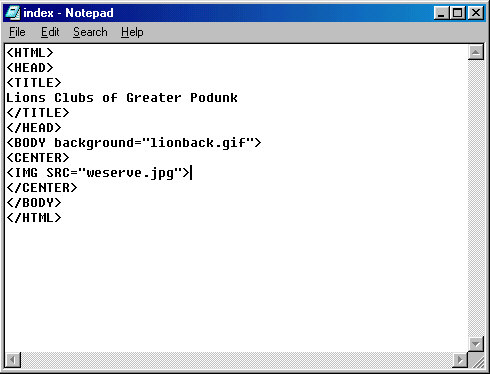
Lets start by placing a picture on our page. Since the code
Your final product should look like this...
Save your file again, replacing the existing file. You now have
We are ready to proceed to Step 10
start adding some content. Everything you put between the [Body]
tag, and the [/BODY] tag will be visible on your web page.
For the sake of simplicity we will just center everything.
To do this we use the tags [CENTER] and [/CENTER]. Everything
between the tags will then move to the center of the page, no
matter what resolution the computer is set for.
calling for the picture will be between the 'BODY' and 'CENTER'
tags, it will appear in the center, as a new layer, on top of the
background. The background will not show through it. The code
for adding a picture is in two parts, (like the background image).
The first part is the [IMG] tag. The second part, inside the 'IMG'
tag brackets is a call for the source file for the image 'src='
Like with the 'background=' call, the filename of the image must be
in quotation marks. (Wierd things happen to people who forget to
use quotation marks. This is a very common error.)
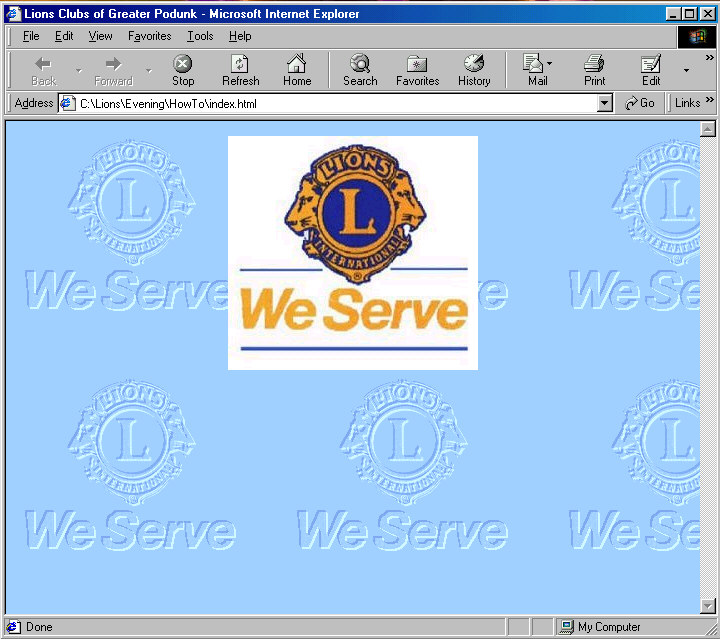
a webpage with a title in the blue bar, a background, and a picture.