
|
|

Text, and links, are pretty straight-forward. Just a few
A link is just a call to open another web page. It can be
An email link is just like a standard link to another web page,
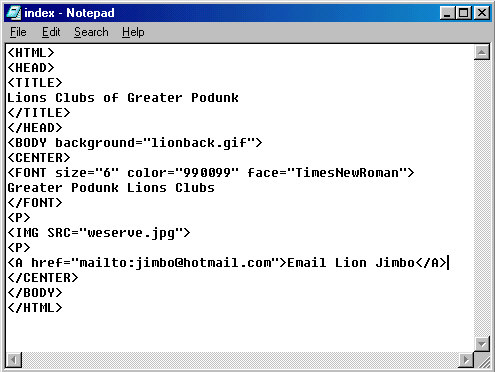
All three tags, for Text, Link, and Email link, are shown here:
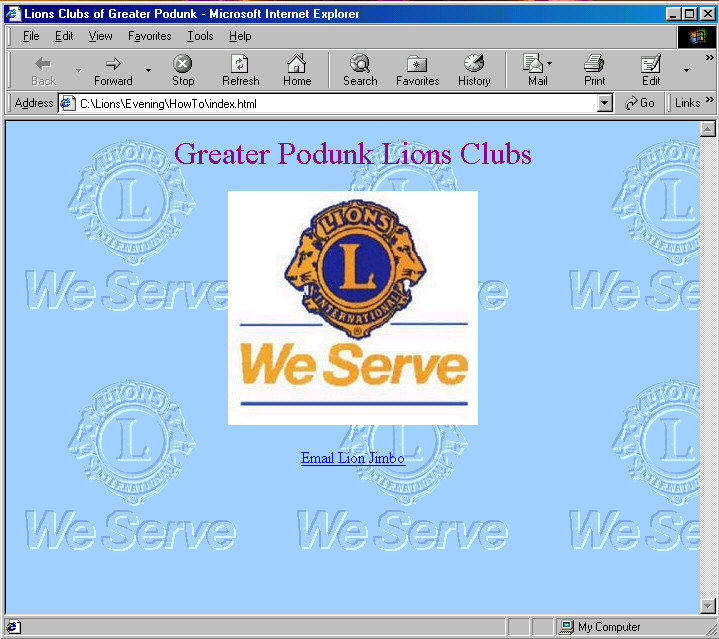
Your final product should look like this...
Save your file again, replacing the existing file. You now have
For more Tips & Tricks, proceed to Step 11
simple rules to remember, then it's off to the races.
The tags for adding words to your page are [FONT][/FONT]
Inside the brackets of the 'FONT' tag are three call with
an equal sign, like we used for the background, and image.
Those three calls are 'size=', 'color=', and 'face='.
Size is just a number in quotation marks. This is NOT the
same number you use in a word processor. This paragraph is
size=4. On the web, size=10 is really big text. Color is the
same six digit code we used when we did the background. Face
is the actual name of the font you want to use. Note: You can
use lots of real fancy fonts to dress up your page, but if the
people viewing the page do not already have those fancy fonts
loaded on their computer, they will just see plain letters.
a call to another page on your own site, or to someone else's
site. The tag for a link to another page is [A HREF=][/A]
After the equal sign put the file name of an 'html' file on
your own site, or the complete URL of a page on another site.
Again, anything after an equal sign must be in quotation marks.
You must put http:// in front of the URL. Unlike just using
a web browser, when writing your own code, nothing is automatic.
You must put something between the tags, like a word, a phrase,
or a picture, so there will be something visible on the page
to click on. Invisible links won't get used.
except, in place of a URL, between the quotation marks, type in
mailto: followed by the email address. Make sure once again
to put something visible on the page to click on.
a complete Lions Club web page.